Top 5 Retrofit Smart Locks
with Apple HomeKey Support
Tap your iPhone or Apple Watch. Door opens. That's HomeKey — the smoothest smart lock experience ever made. Here are the best retrofit locks that support it.
Affiliate Disclosure: This site contains affiliate links. As an Amazon Associate, we earn from qualifying purchases. This supports our free testing and reviews at no extra cost to you. We only recommend products our research genuinely supports. Read our full affiliate disclosure.
HomeKey is just one category. For a broader look at every feature set — budget, Matter, Airbnb — check our full list of top-rated retrofit smart locks where we ranked all 7 top picks with research-based scores.
HomeKey: The Four Things That Make It Special
HomeKey isn't just another smart lock app. It's a fundamentally different way of thinking about door access.
What Is HomeKey?
HomeKey is Apple's NFC-based door unlock technology, built into iOS Wallet. Hold your iPhone or Apple Watch near a HomeKey-certified lock and it unlocks instantly — no app, no Face ID, no lag. It's the same technology behind Apple Pay, applied to your front door.
Power Reserve Mode
This is the feature that makes people's jaws drop: HomeKey continues working for up to 5 hours after your iPhone battery reaches 0%. A special Power Reserve card appears on your Lock Screen. Apple Watch HomeKey activates at 1% battery. You will never be locked out by a dead phone.
Fully Offline — No Internet Required
HomeKey operates entirely over NFC — a direct device-to-lock connection. No Wi-Fi, no cellular, no Bluetooth required for the tap-to-unlock action. This means HomeKey works even if your router is down, your power is out, or you're in a cellular dead zone.
Express Mode — No Authentication Needed
HomeKey uses Express Mode by default — meaning you don't need to open your phone, unlock it, or use Face ID before tapping. Just hold it near the lock. You can optionally require Face ID confirmation for added security in the HomeKey settings.
Compatible devices: iPhone XS (2018) or later running iOS 16+, Apple Watch Series 4 or later running watchOS 9+. HomeKey does NOT require a separate app — it lives in the native iOS Wallet app. Android phones do not support HomeKey.
Top 4 Retrofit Locks with Apple HomeKey Support
Every pick below confirmed HomeKey certified and compatible with iPhone XS or later.
Level Lock+ WiFi Deadbolt
Matter Ready"The only HomeKey lock that's 100% invisible from outside. Tap your iPhone — door opens. Landlords and neighbors see a standard deadbolt. Nothing more."
- Completely invisible exterior — no visual change
- Apple HomeKey tap-to-unlock via iOS Wallet
- Thread-native for 2026 Matter ecosystem
- Apple Watch unlock supported
- Lock/unlock from anywhere via built-in WiFi
Pro Tip: Level Lock+ has no keypad. Family members or guests without HomeKit access will need a physical key. Plan your key distribution before installation.
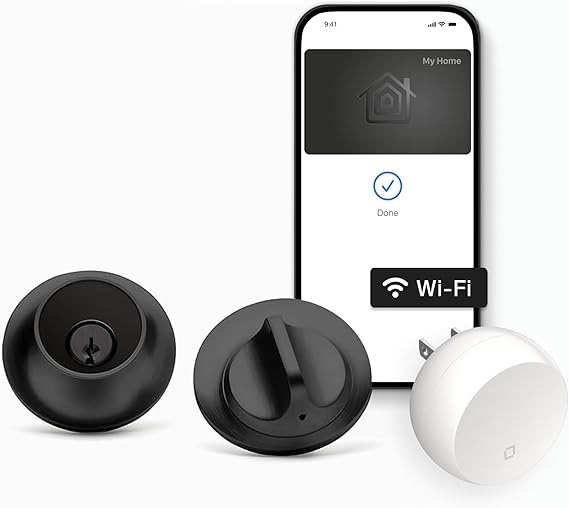
Aqara UWB Smart Lock U400
Matter Ready"The 2026 powerhouse: native Matter-over-Thread AND Apple HomeKey in one affordable retrofit package. Fingerprint + keypad + app + HomeKey — nothing else comes close."
- Native Matter-over-Thread + HomeKey in one device
- Works simultaneously with Apple, Google, and Amazon
- Fingerprint + touchscreen keypad + HomeKey triple access
- Rechargeable battery — no AA replacements
- Auto-calibrates to your specific deadbolt
Pro Tip: The Aqara U400 requires a Thread Border Router for its Matter capabilities (Apple TV 4K, HomePod mini, or Google Nest Hub 2nd gen). You likely already have one — check first.

Schlage Encode Plus Smart Wi-Fi Lock
"ANSI Grade 1 security certification — the highest physical security rating — plus Apple HomeKey. The only lock on this list that pairs maximum security with tap-to-unlock."
- ANSI Grade 1 — industry highest security rating
- Built-in HomeKey + 100 PIN code slots
- Built-in forced entry alarm
- Full all-metal premium build quality
- Apple HomeKey + Alexa + Google Home
Pro Tip: Schlage Encode Plus is a full deadbolt replacement — not a retrofit adapter. Homeowners love it. Renters should confirm with landlords first before purchasing.

Level Bolt
"Level Bolt is the true renter HomeKey option — it replaces only the interior lock cylinder, leaving the exterior 100% untouched, unlike Level Lock+ which swaps the whole deadbolt."
- Interior-only installation — exterior completely unchanged
- Apple HomeKey NFC tap-to-unlock
- Physically indistinguishable from standard lock
- Bluetooth + HomeKit automation support
- Best renter-safe HomeKey option
Pro Tip: Level Bolt vs Level Lock+: The Bolt replaces only the interior cylinder mechanism. The Lock+ replaces everything including the exterior. For renters, Bolt is the safer choice.
Ready to install one of these locks yourself? Our step-by-step installation guide → walks through every step in 15 minutes or less. All 4 picks above use standard US single-cylinder deadbolt compatibility.
Home Automations That Change Everything
HomeKey locks are just the entry point. When paired with Apple HomeKit, your door becomes the trigger for your entire home's intelligence.
Trigger
Arriving Home
Trigger
Last Person Leaves
Trigger
Bedtime Scene
Trigger
After-Hours Entry (10pm–6am)
How to Set Up HomeKit Automations
Open the Apple Home app → Tap + → Add Automation → "When someone arrives" or "When an accessory is controlled." Select your HomeKey lock as the trigger. Then add any Home-compatible device as the action. Automations run locally on your HomePod or Apple TV — no internet required.
Requires HomeKit hub: Apple TV 4K, HomePod mini, or HomePod (2nd gen) for automations to work when you're away from home.
Apple HomeKey Smart Lock FAQ
Head-to-Head Comparisons
You might also like
Both support Apple HomeKey — but Aqara adds fingerprint, keypad, and Matter-over-Thread support for every other platform. Which trade-off is right for your home?
Verdict: Aqara wins for multi-ecosystem homes. Level wins for Apple-only households.
Schlage Encode Plus is the only HomeKey lock with ANSI Grade 1 security certification. See how it stacks up against the smart-feature king.
Verdict: Schlage wins for security + HomeKey. August wins for smart features + Airbnb.
From the Same Category
Aqara U400 vs Level Lock+: Matter vs HomeKey
Thread-native on both sides — different philosophies, one clear winner per ecosystem.
Read →TechnicalMatter 1.4 Smart Locks: Everything You Need to Know
LIT protocol, Enhanced Multi-Admin, and Thread Border Routers in plain English.
Read →Best OfThe 7 Best Retrofit Smart Locks of 2026
Matter-certified locks ranked inside our flagship 2026 buyer's guide.
Read →Last verified by the Editorial Team
Content accuracy, product specs, and pricing reviewed on March 20, 2026. Our methodology cross-references manufacturer specifications, certified lab data, and verified buyer reports before every update.
All recommendations are based on independent third-party research and publicly available data. HomeKey compatibility sourced from manufacturer documentation and iOS 18.3 / watchOS 11 release notes. Prices fluctuate — verify on Amazon before purchasing.